In this guide
One of the things I like most about shooting Fujifilm is that a photo can already look finished when I take it.
Not almost finished. Not “good enough until I edit the RAW file later.”
Actually finished.
That is a big part of the appeal of Fujifilm film simulations and custom recipes. You can decide on the look before taking the photo, shoot it, transfer the JPEG and use it exactly as it came out of the camera.
And that has changed the way I use Lightroom.
I mostly shoot JPEG now.
Not because RAW is useless, or because JPEG is technically better. I simply find that Fujifilm gets me close enough to the look I want in-camera that I rarely feel the need to start editing every photograph from scratch.
So, do you still need Lightroom if you shoot Fujifilm JPEGs?
For me, not very often.
Fujifilm has not made Lightroom completely unnecessary. It has made editing optional much more of the time.


Quick answer: Do you need Lightroom with Fujifilm?
No.
You can absolutely shoot Fujifilm JPEGs without using Lightroom at all.
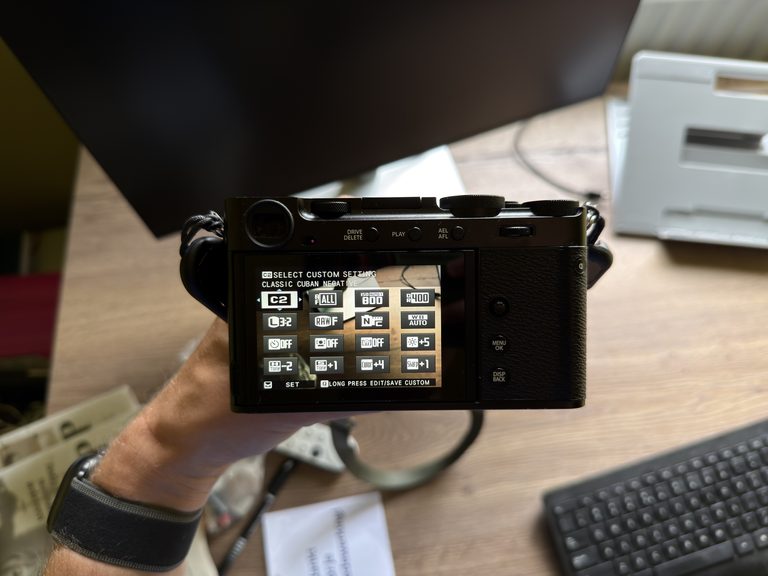
Fujifilm gives you a lot of control over the final JPEG in-camera, including:
- film simulation
- white balance
- white balance shift
- highlights
- shadows
- color
- sharpness
- noise reduction
- grain
- Color Chrome Effect
- Color Chrome FX Blue
- clarity
When you combine those settings into a Fujifilm recipe, you can create a repeatable look before you even press the shutter.
That is how I prefer to photograph most of the time.
I would rather get the image close to what I want while I am actually taking it than assume I will fix the look later in Lightroom.
New to Fujifilm recipes? A recipe combines a film simulation with settings such as white balance, highlights, shadows, color and grain to create a repeatable JPEG look in-camera. Learn how to use Fujifilm recipes
Why Fujifilm JPEGs are different
Every digital camera can produce JPEGs.
What makes Fujifilm interesting is how much control you have over how those JPEGs look.
Film simulations such as Classic Chrome, Classic Negative, Velvia, Acros and Reala Ace give you a starting point.
Recipes go further.
You can combine a film simulation with changes to white balance, color, highlights, shadows, grain and other JPEG settings to create a specific aesthetic.
The important part is that those decisions happen before the photograph is taken.
That changes the whole process.
Instead of thinking:
I’ll figure out what this should look like in Lightroom later.
you can think:
This is the mood I want here.
Then you photograph with that look already visible.
For me, that is much more satisfying.

I mostly shoot JPEG now
This is probably the biggest change Fujifilm has made to my photography workflow.
I do not automatically shoot RAW because I assume every photograph needs editing later.
Most of the time, I shoot JPEG.
If I like the exposure, the composition and the way the recipe handled the scene, that is usually the finished image.
I can transfer it, share it or keep it without opening Lightroom at all.
That is especially useful when I am travelling.
I would rather spend my time walking around, photographing and exploring than return with hundreds of RAW files that I feel obligated to edit.
A good JPEG removes that extra step.
And honestly, I often prefer the image when I leave it alone.
Part of keeping my JPEG workflow simple is not constantly switching between a huge collection of looks. I normally rely on a small set of recipes that I know well. You can read more about that in How Many Fujifilm Recipes Do You Actually Need?.
Fujifilm recipes replace a lot of basic Lightroom editing
Think about what you often do to a RAW file after importing it into Lightroom.
You might:
- change the profile
- adjust white balance
- add contrast
- alter highlights and shadows
- change saturation
- tweak colors
- add grain
- sharpen the image
A Fujifilm recipe can make many of those creative decisions before you take the photograph.
That does not mean a JPEG has the same editing flexibility as RAW.
It does not.
But if you are already happy with the result, you do not necessarily need that extra flexibility.
That is the part I think gets lost in a lot of RAW vs JPEG discussions.
The question is often framed as:
Which file contains more information?
Obviously RAW.
But the more useful question for me is:
Does this photograph actually need more editing?
Often, the answer is no.
Film simulations and recipes are often mentioned together, but they are not interchangeable. A film simulation is the built-in starting point, while a recipe adds extra JPEG settings around it to create a more specific look. I explain the distinction in Fujifilm Film Simulations vs Recipes: What’s the Difference?.
Fujifilm JPEG vs RAW: what is the actual difference?
A RAW file contains much more of the information captured by the camera sensor.
A JPEG has already been processed according to the settings selected in the camera.

That means RAW gives you more freedom later.
With RAW you have more room to:
- recover highlights
- lift dark shadows
- change white balance
- make aggressive color changes
- correct difficult exposures
- use local masks
- produce several completely different versions of the same image
A JPEG gives you less latitude because those processing decisions have already been made.
But that does not automatically make JPEG the worse choice.
If the image already looks right, unlimited editing flexibility has very little value.
I think of it like this:
RAW gives you more possibilities. JPEG gives you less work.
Most of the time, I prefer the second.
When I don’t need Lightroom
There are plenty of situations where Lightroom adds very little to my workflow.
Travel photography
This is probably where Fujifilm JPEGs make the most sense for me.
When travelling, I want to photograph rather than edit.
If the JPEG already has the look I wanted, I can use it immediately.
That means less time sorting through RAW files afterwards and more photographs that actually make it out of Lightroom limbo.
My travel recipes: I use different Fujifilm looks depending on weather, landscape and light. I collected the recipes that work particularly well for travelling in Switzerland in a separate guide. See my Fujifilm travel recipes
Everyday photography
For ordinary walks, city photography and everyday moments, I rarely feel the need for a full RAW workflow.
The JPEG is usually enough.
Street photography
Recipes work particularly well here because you can maintain a consistent look across a series of photographs.
I would much rather concentrate on timing, composition and what is happening around me than think about how I will edit each file later.
When the JPEG simply looks right
Sometimes there is no technical argument.
The photograph looks how I wanted it to look.
That is enough.
When Lightroom is still useful
There are still situations where I would rather have more editing control.
Difficult exposure
If the sky is much brighter than the foreground, RAW gives you far more room to recover details.
A JPEG is much less forgiving if you underexpose or blow highlights.
Mixed or ugly lighting
Recipes often rely on a specific white balance.
That can work beautifully outside and then fall apart under artificial or mixed indoor lighting.
RAW makes it much easier to correct that afterwards.
Local adjustments
A recipe applies its look to the whole image.
Lightroom allows you to adjust individual areas.
You can brighten one subject, darken the sky, add texture to mountains or change part of the color palette without affecting everything else.
That is something an in-camera recipe cannot really replace.
Important photographs
There are photographs where keeping the extra flexibility is simply sensible.
If I know an image matters, or the lighting is difficult, having the RAW gives me options later.
But that is very different from treating RAW as mandatory for every shot.
RAW is useful as a backup, not a requirement
I do not think RAW is something you need to avoid.
It is useful.
But I also do not think every photograph automatically needs to become a RAW editing project.
That is the distinction Fujifilm has changed for me.
The JPEG is usually the main image.
RAW is useful when I know I may need more latitude.
If I do not need it, I do not feel compelled to edit just because the file exists.
That makes the whole process feel much lighter.
If you mainly shoot JPEG, those differences matter more because the recipe becomes part of the finished file. I wrote separately about why I mostly shoot Fujifilm JPEGs instead of relying on RAW and Lightroom.
Do Fujifilm recipes affect RAW files?
Not in the same way they affect JPEGs.
A Fujifilm recipe determines how the camera processes the JPEG.
The RAW file keeps the underlying sensor data, which means you can process it differently later.
Some camera settings may be recorded as metadata and recognised by compatible software, but the custom JPEG look itself is not permanently baked into the RAW data.
So even if you photograph using a strong recipe, the RAW still gives you the option to create something completely different afterwards.
Will your recipes work on another Fujifilm camera? Not every Fujifilm body has exactly the same film simulations and JPEG settings. I made a compatibility guide showing what changes between camera generations. Check Fujifilm recipe compatibility
Can you edit Fujifilm JPEGs in Lightroom?
Yes.
You do not have to choose between shooting JPEG and using Lightroom.
You can still edit a Fujifilm JPEG afterwards.
Small adjustments such as:
- cropping
- straightening
- slight exposure changes
- small color corrections
are usually completely fine.
The difference is that JPEG gives you less room for large corrections.
If I need to make major changes, I would rather start from RAW.
But if I only want to straighten the horizon or brighten the image slightly, I am not going to open the RAW simply because it is theoretically better.


Do Fujifilm recipes replace Lightroom presets?
Not exactly.
They can produce a similar result in the sense that both give you a repeatable visual style.
But the experience is very different.
A Lightroom preset is applied after taking the photograph.
A Fujifilm recipe affects the JPEG while you are shooting.
That means you can already see the look in the viewfinder.
And I think that matters.
The colors and contrast you see can influence what you decide to photograph.
A recipe becomes part of taking the image rather than something added afterwards.
That is one of the reasons I enjoy using them.
The downside of JPEG-only shooting
The obvious downside is that sometimes you get it wrong.
Maybe the white balance does not suit the light.
Maybe the shadows are too heavy.
Maybe a recipe that looks great on a cloudy day does not work under harsh midday sun.
Once that is baked into the JPEG, your options are more limited.
That is the trade-off.
You get a faster, simpler workflow, but you give up some flexibility.
For me, that is usually worth it.
But it also means I pay more attention to which recipe I use and whether it suits the conditions.
Photographing on grey days? Cloudy weather can actually work extremely well with the right film simulation and JPEG settings. These are the Fujifilm recipes I recommend when the sky turns grey. See the best recipes for cloudy weather
A good Fujifilm recipe should reduce editing
I think this is ultimately the point.
Recipes are not useful because they prove Lightroom is unnecessary.
They are useful because they can get you closer to the finished image while you are still photographing.
If a recipe means I can take a photo, like it and move on, that is valuable.
I do not want every photograph to become another task waiting for me in an editing queue.
Sometimes I just want to take the photograph.
And Fujifilm JPEGs let me do that far more often.

So, do you still need Lightroom with Fujifilm?
Not necessarily.
I mostly shoot JPEG, and a large part of the reason I enjoy Fujifilm is that I often do not need to edit afterwards.
The film simulations and recipes get me close enough to the look I want that Lightroom is no longer an automatic second step.
That does not mean Lightroom is useless.
There are still times when RAW gives me the flexibility I need, especially with difficult light, exposure problems or more demanding edits.
But Lightroom has changed from being part of my normal photography workflow into something I use when a photograph actually needs it.
And I prefer it that way.
Fujifilm did not make Lightroom obsolete for me. It made editing optional.
Frequently asked questions